Pakistan has over 40 million JazzCash users. The account opens in under five minutes. Whether you receive pocket money as a student, Fiverr payments as a freelancer, or customer payments as a business owner — knowing how to open a JazzCash account is the first step to faster, cheaper digital payments in Pakistan.
What You Need Before You Start
- A valid NADRA CNIC registered in your own name
- A Pakistani SIM registered to your CNIC
- A smartphone with internet for the app method
- Your CNIC issue date for the *786# method on Jazz SIM
No minimum balance. No documents beyond your CNIC. No bank branch visit. JazzCash is run by Mobilink Microfinance Bank — a fully regulated Pakistani financial institution under State Bank of Pakistan supervision.
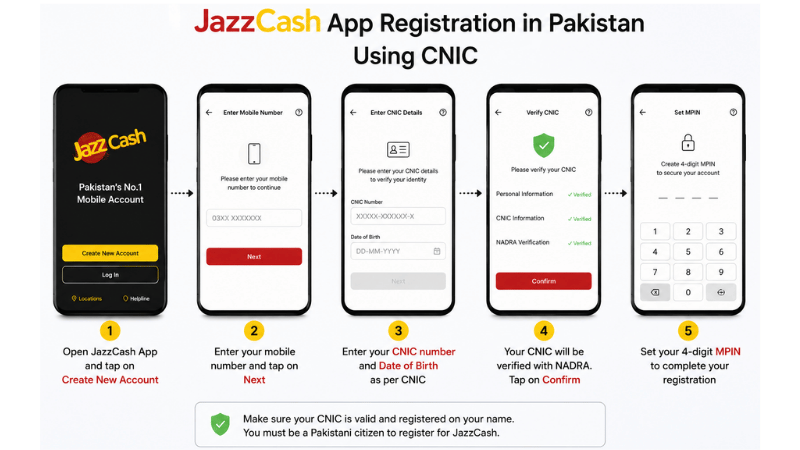
How to Open JazzCash Account Using the App
This works on any network — Jazz, Telenor, Zong, or Ufone.
- Download JazzCash from Google Play Store or Apple App Store. Free to download.
- Tap Register. Enter the mobile number registered to your CNIC.
- Enter your CNIC number — all 13 digits without dashes.
- Create your MPIN — a 4-digit Mobile PIN. This is your password for every transaction. Write it down somewhere safe and never share it with anyone.
- Confirm MPIN by entering it a second time.
- Enter the OTP sent by SMS to your registered number. Enter within 2 minutes.
- Done. You receive a confirmation SMS. Your JazzCash number is your mobile number.
The whole process takes 4 to 5 minutes on a working internet connection.
How to Open JazzCash Account by Dialing *786#
This method works on Jazz and Warid SIMs without a smartphone.
- Dial *786# from your Jazz or Warid SIM
- Follow the on-screen prompts
- Enter your CNIC issue date when asked
- Create and confirm your 4-digit MPIN
- Receive confirmation message — account active immediately
How to Open JazzCash Account Through an Agent
Bring your original CNIC to any JazzCash agent or Jazz franchise. Tell them you want a new account. They register it on their terminal. You set your MPIN. Done in under 10 minutes.
Agent-registered accounts start at Level 2 with a Rs. 500,000 monthly limit — higher than self-registration. Best for freelancers who expect regular payments.
JazzCash Account Levels and Limits
| Level | How to Get It | Monthly Limit |
|---|---|---|
| Level 0 | App registration only | Rs. 25,000 |
| Level 1 | CNIC verified in app | Rs. 50,000 |
| Level 2 | Biometric at agent | Rs. 500,000 |
| Level 3 | Business documents | Rs. 2,000,000+ |
What You Can Do After Opening Your JazzCash Account
Send and receive money instantly: Transfer to any JazzCash number or CNIC at any time — including Eid holidays and midnight.
Pay utility bills: WAPDA, KESC, SSGC, PTCL, and others — directly from the app. No queues.
Mobile top-up: Recharge any Pakistani network from inside the app.
Government payments: JazzCash is the primary platform for BISP disbursements and government welfare scheme payments.
JazzCash Mastercard debit card: Apply inside the app for a physical Mastercard. Use it at ATMs across Pakistan or for online purchases where Mastercard is accepted.
Receive freelancing payments: Pakistani freelancers link JazzCash to Payoneer to receive Fiverr and Upwork earnings in PKR. To learn the full payment chain, read how to create a Payoneer account in Pakistan.
Critical MPIN Warning — Read This Before You Finish
Your MPIN is the 4-digit code that authorises every JazzCash transaction. Never share it with anyone — not JazzCash customer service, not family members, not a shop agent.
JazzCash will never call or message you asking for your MPIN. If anyone asks for it — that is a fraud attempt. Hang up or ignore immediately.
If you forget your MPIN: reset through the app or dial *786# on your Jazz SIM and follow the reset prompts.
Common Problems When Opening a JazzCash Account
SIM not in your name: The most common reason registration fails. Transfer SIM ownership to your CNIC at any Jazz franchise or NADRA office first.
Expired CNIC: JazzCash requires a valid, unexpired CNIC. Renew at NADRA before trying again.
OTP not arriving: Check signal. Restart your phone and try again. If it still fails, call JazzCash on 051-111-124-444.
Want to compare JazzCash with Easypaisa before deciding? Read our full Easypaisa vs JazzCash comparison. For newer digital wallets with Pakistani IBAN features, check our NayaPay account guide. For a full overview of how to earn money online and receive payments in Pakistan, see online earning in Pakistan.
Frequently Asked Questions
Can I open a JazzCash account without a Jazz SIM?
Yes. The app method works on any Pakistani SIM. Only the *786# method requires a Jazz or Warid SIM.
Is it free to open a JazzCash account?
Yes. Opening a JazzCash account is completely free. Transaction fees apply for certain services like agent cash withdrawals.
What is MPIN and why does it matter?
MPIN is your 4-digit Mobile PIN that authorises every JazzCash transaction. Never share it with anyone. JazzCash will never ask for it by phone or SMS.
How long does activation take?
Instant. As soon as you receive the confirmation SMS, your account is active.
Can Pakistani students open a JazzCash account?
Yes. Any Pakistani citizen with a valid CNIC can open a JazzCash account regardless of age, employment, or income.
How do I increase my JazzCash transaction limit?
Visit any Jazz franchise with your CNIC for biometric verification. This upgrades you to Level 2 with a Rs. 500,000 monthly limit.
Final Thoughts
You now know exactly how to open a JazzCash account — through the app in five minutes, through *786# on Jazz SIM, or through an agent for higher limits. Open yours today at jazzcash.com.pk and get instant access to Pakistan’s most widely used digital payment system.