
Most Pakistanis searching for free AI tools focus on ChatGPT and DeepSeek. They miss one of the most capable options — already installed on their laptop, requiring no new account, and including free AI image generation that ChatGPT charges for. This guide shows exactly how to use Microsoft Copilot in Pakistan for free.
Is Microsoft Copilot Free in Pakistan?
Yes. Learning how to use Microsoft Copilot in Pakistan starts with one fact — it requires no VPN, no payment, and no new account if you already have a Microsoft or Outlook email. It works on Jazz, Telenor, Zong, and Ufone without any restrictions.
Copilot uses GPT-4o — the same technology as ChatGPT Plus — but the free version always includes real-time web search and free AI image generation through DALL-E 3. ChatGPT requires a paid subscription for both of those features.
How to Use Microsoft Copilot in Pakistan: 4 Methods
Method 1 — Website (any device, any network)
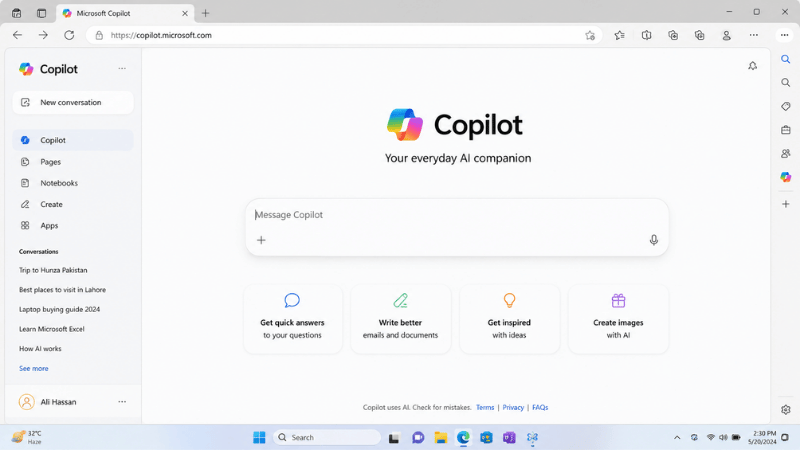
- Open any browser and go to copilot.microsoft.com
- Sign in with your Microsoft account — or create one free in 2 minutes
- Type your question and press Enter
Method 2 — Microsoft Edge browser (built-in)
- Open Microsoft Edge on your laptop or phone
- Look for the Copilot icon in the top right corner — a small coloured star
- Click it — a Copilot panel opens on the right side of your screen
- Ask questions about any webpage you’re viewing, or start a fresh conversation
Method 3 — Windows 11 shortcut (fastest)
- Press Windows key + C on your keyboard
- The Copilot sidebar opens immediately on the right
- Sign in with your Microsoft account if prompted
Method 4 — Mobile app
- Search “Microsoft Copilot” on Google Play Store or Apple App Store
- Install the free official app
- Sign in with your Microsoft account
What Copilot Free Includes That ChatGPT Free Doesn’t
| Feature | Copilot Free | ChatGPT Free |
|---|---|---|
| AI model | GPT-4o | GPT-4o Mini (GPT-4o limited) |
| Real-time web search | Always on ✅ | Limited |
| Free AI image generation | DALL-E 3 — Free ✅ | Very limited free |
| Edge browser sidebar | Built in ✅ | No |
| Windows 11 integration | Built in ✅ | No |
| VPN needed in Pakistan | No ✅ | No ✅ |
Free AI Image Generation in Pakistan Through Copilot
This is Copilot’s most underused feature in Pakistan. Go to bing.com/images/create with your Microsoft account. Type a description of any image. DALL-E 3 generates it free.
Pakistani bloggers use this for featured images. Social media managers create post graphics. Fiverr designers use it for concept visuals. All free, all high quality. You get 15 fast generations per day and unlimited slow generations.
This replaces paid tools like Midjourney for most everyday image needs. For design work in general, Canva in Pakistan handles templates and layouts while Copilot’s image generator creates custom visuals to place inside those designs.
How Pakistani Users Actually Use Microsoft Copilot
The Edge sidebar for research: A student in Karachi reads a research paper online. They open the Copilot sidebar, click “Summarise this page,” and get a clear summary in 10 seconds without leaving the tab. They ask follow-up questions about specific sections. No copy-pasting into a separate AI tool.
Professional email drafting: A Pakistani freelancer needs to write a proposal email to an international client in formal English. They paste their rough idea into Copilot and ask for a professional rewrite. GPT-4o produces polished language every time.
Image generation for content work: A Pakistani blogger needs a featured image for their article about online earning. They describe it in Copilot’s image creator and download the generated image. Zero cost, publication-ready quality.
Common Mistakes When Using Microsoft Copilot in Pakistan
Not signing in: Anonymous Copilot use has much lower daily limits. Sign in with a free Microsoft account to unlock the full experience.
Missing the image generation feature: Most Pakistani users only discover Copilot’s chat. The free image generation at bing.com/images/create is the feature that makes Copilot stand out from other free AI tools.
Treating it only as a search engine: Copilot reasons, writes, creates, and analyses. Ask it to build something — a proposal, a code snippet, a content plan — not just to retrieve information.
For a full comparison of Copilot against ChatGPT and DeepSeek, see our guide on ChatGPT in Pakistan and DeepSeek in Pakistan. For all free AI tools available in Pakistan in one place, visit the best AI tools in Pakistan guide. For writing specifically, our best AI writing tools free guide ranks every option.
Frequently Asked Questions
Is Microsoft Copilot really free in Pakistan?
Yes. The free version at copilot.microsoft.com uses GPT-4o, includes real-time web search, and generates images through DALL-E 3 — all at no cost.
Do I need a VPN to use Copilot in Pakistan?
No. Microsoft Copilot loads on Jazz, Telenor, Zong, and Ufone without any VPN.
Is Copilot the same as ChatGPT?
Both use GPT-4o technology. Copilot always includes web search and free image generation. ChatGPT has a stronger creative writing focus and a larger user community. Both are free.
Can Pakistani students use Copilot for studying?
Yes. The Edge sidebar summarises study material from any webpage. The Windows integration lets you ask questions while switching between apps. The free image generation creates visual aids for presentations.
Where do I find Copilot’s image generation?
Go to bing.com/images/create with your Microsoft account. This is DALL-E 3 quality image generation, completely free, with 15 fast generations per day.
Final Thoughts
Knowing how to use Microsoft Copilot in Pakistan gives you GPT-4o quality, always-on web search, and free DALL-E 3 image generation — all available right now without any new accounts or VPN.
Go to copilot.microsoft.com, sign in with your Microsoft account, and try the image generator today. It’s the feature most Pakistani users don’t know exists.