
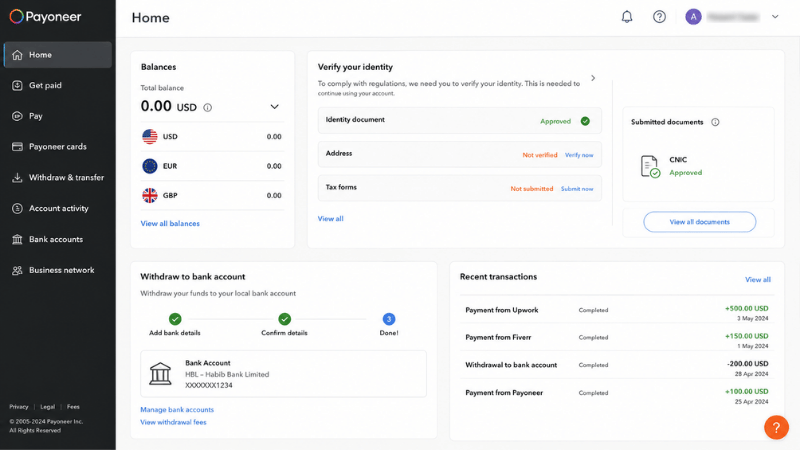
For Pakistani freelancers earning on Fiverr, Upwork, or any international platform — Payoneer is the bridge between your earnings and your Pakistani bank account. Without it, receiving dollars from abroad involves slow, expensive wire transfers. With it, money arrives in 2-3 business days at much lower cost. This guide shows you exactly how to create a Payoneer account in Pakistan and set it up completely.
Why Pakistani Freelancers Need Payoneer
Most international platforms — Fiverr, Upwork, Amazon, Google AdSense — pay Pakistani users through Payoneer. It’s their primary payment partner for Pakistan. Without Payoneer, you’re waiting for complex international wire transfers that take a week and cost $20-40 in bank fees. With Payoneer, the same transfer takes 2-3 days and costs a fraction of that.
Payoneer also works with Wise Pakistan, which offers competitive exchange rates as an alternative withdrawal route once your account is established.
How to Create Payoneer Account in Pakistan: Step by Step
Step 1 — Go to Payoneer
Open payoneer.com. The site loads in Pakistan without VPN.
Important: Don’t use a VPN when signing up for or using Payoneer. Like other financial platforms, Payoneer flags accounts using VPN connections as potential security risks.
Step 2 — Click Get Started
Select “Receiving payments from companies or marketplaces.” This is the correct option for Fiverr and Upwork users.
Step 3 — Fill in your personal details
Use your exact name as it appears on your CNIC. Any mismatch causes verification failure. Use an active email address you check regularly.
Step 4 — Enter your Pakistani address and phone number
Your CNIC address works. Use your active mobile number — it receives verification codes.
Step 5 — Set USD as your account currency
Most international freelancing platforms pay in US dollars. USD is the most useful currency for Pakistani freelancers.
Step 6 — Create a strong password
Payoneer holds real money. Use a unique password you don’t use elsewhere. Enable two-factor authentication immediately after creating your account — this is essential, not optional.
Step 7 — Verify your email
Payoneer sends a confirmation email. Click the link. Your account is created.
CNIC Verification for Pakistani Payoneer Accounts
Payoneer requires identity verification before you can receive payments above $200. This is a State Bank of Pakistan regulatory requirement.
- Log in and find the verification notification in your dashboard
- Upload a clear, well-lit photo of both sides of your CNIC — all four corners visible, no glare
- Upload a selfie holding your CNIC for liveness verification
- Submit — approval takes 2-5 business days
If your CNIC is damaged or worn, visit NADRA for a replacement before applying. Damaged CNICs are frequently rejected.
How to Link Payoneer to Fiverr
- Log into Fiverr → Account → Billing → Withdrawal Methods
- Click Add Withdrawal Method → Select Payoneer
- Log into Payoneer when prompted and authorise the connection
- Done — future Fiverr withdrawals go directly to your Payoneer balance
How to Link Payoneer to Upwork
- Log into Upwork → Settings → Get Paid
- Select Add Payment Method → Payoneer
- Authorise the connection when prompted
- Set Payoneer as your default payment method
How to Withdraw from Payoneer to Pakistani Bank Account
- Log into Payoneer → Withdraw → To Bank Account
- Enter your bank details — IBAN and SWIFT code
- Enter the USD amount
- Review the conversion rate and fees
- Confirm — funds arrive in your Pakistani bank in 2-5 business days converted to PKR
Pakistani banks that handle international transfers reliably: HBL, Meezan Bank, Bank Alfalah, MCB. Ask your bank’s international department for your IBAN and SWIFT code before setting up the first transfer.
How to Withdraw from Payoneer to JazzCash
If JazzCash is available as a direct withdrawal option in your Payoneer account: Withdraw → JazzCash → enter your registered mobile number → confirm.
If not available directly: transfer to your Pakistani bank account first, then use your bank’s app to transfer to JazzCash. This adds one step but the result is the same — PKR in your JazzCash wallet. For JazzCash setup, see our guide on how to open a JazzCash account.
Alternative: Wise Pakistan
Wise (formerly TransferWise) is now available in Pakistan and offers competitive exchange rates compared to Payoneer’s bank transfer fees. Once your Payoneer account is established, check Wise as an alternative route for withdrawals — especially for larger amounts where the exchange rate difference matters more.
Payoneer Fees for Pakistani Users
| Service | Fee |
|---|---|
| Account opening | Free |
| Receiving from Fiverr or Upwork | Free |
| Transfer to Pakistani bank | ~2% + exchange spread |
| Annual inactivity fee | $29.95 if no activity for 12 months |
Keep your account active with at least one transaction per year to avoid the inactivity fee.
Common Problems Creating Payoneer Account in Pakistan
CNIC verification rejected: Most common causes — blurry photos, glare on the CNIC surface, name mismatch between CNIC and account, expired CNIC. Resubmit with clear photos in natural light.
Name mismatch: Your Payoneer account name must exactly match your CNIC — including middle names and spacing. Even small differences cause verification failure.
Account limited after first payment: Payoneer applies additional verification after the first significant payment. Submit the requested documents promptly to remove the limitation.
For more payment options including accounts with Pakistani IBAN numbers for direct international transfers, see our guide on NayaPay account opening. For the full picture on online earning and payments, read our guide on online earning in Pakistan and how to earn from Fiverr in Pakistan. If you’re on Upwork, our Upwork Pakistan guide covers the payment setup there too.
Frequently Asked Questions
Is Payoneer free to create in Pakistan?
Yes. Creating a Payoneer account is free. Fees apply when transferring to a Pakistani bank — approximately 2% plus the exchange rate spread.
Can Pakistani students create a Payoneer account?
Yes, if they’re 18 or older with a valid CNIC. Payoneer requires users to be 18+ with valid national ID.
How long does Payoneer CNIC verification take in Pakistan?
2-5 business days after submitting clear CNIC photos. You receive an email when verification is complete.
What documents does Payoneer need from Pakistan?
A clear photo of both sides of your CNIC and a selfie holding your CNIC. No other documents are required for the standard individual account.
Final Thoughts
Set up your Payoneer account before your first Fiverr or Upwork order. The CNIC verification takes a few days — start it now so you’re ready to withdraw the moment your first earnings clear. That’s exactly how to create a Payoneer account in Pakistan and have it ready before you need it.